What is a DNS Resolver?
A DNS resolver performs recursive DNS queries on behalf of users and applications to locate the authoritative server for a domain name.
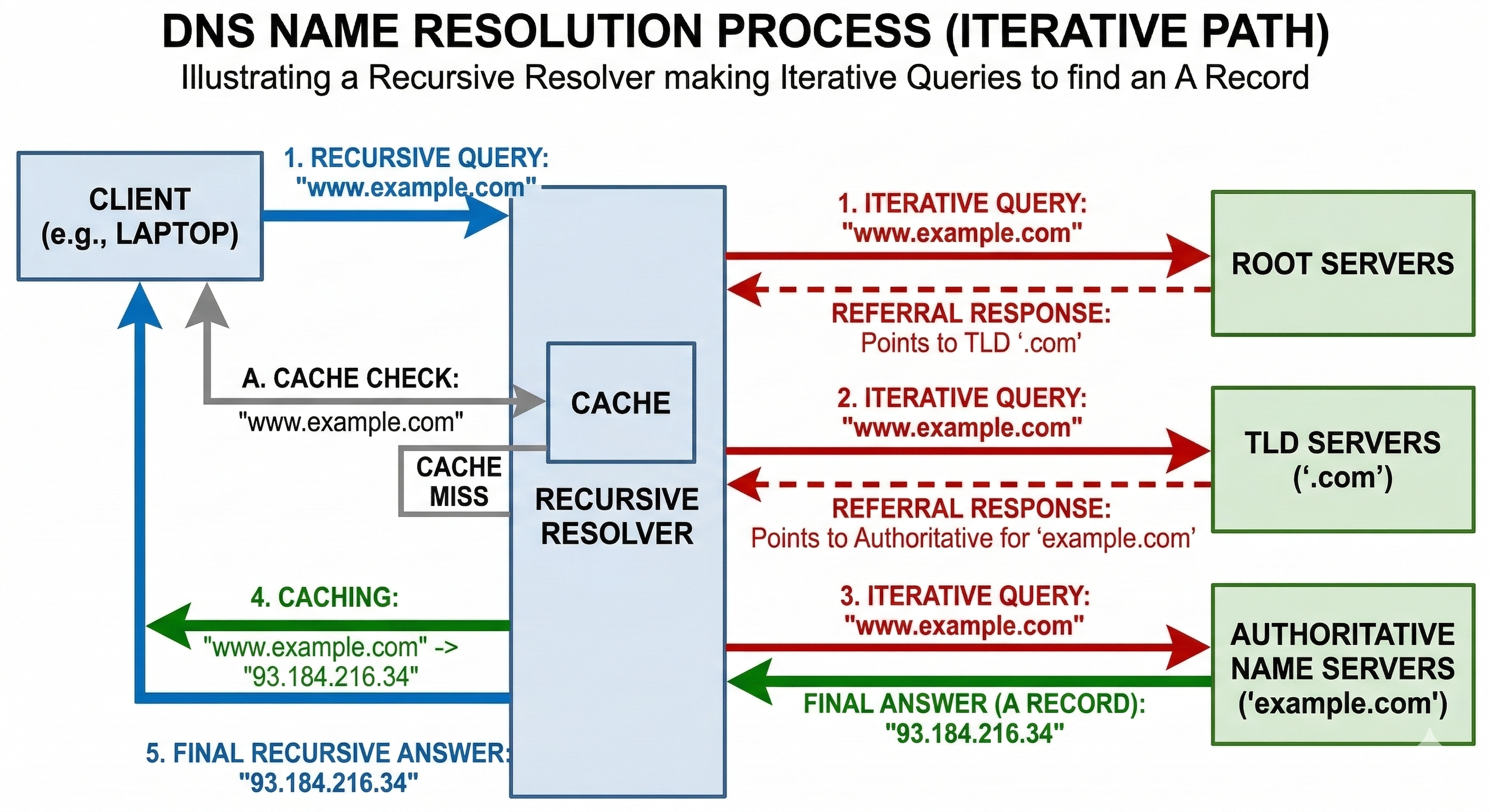
A DNS resolver performs recursive DNS queries on behalf of users and applications to locate the authoritative server for a domain name.
A DNS resolver (also called a recursive resolver) is a server that receives DNS queries from clients and performs the work of locating the correct DNS records across the global DNS infrastructure.
Resolvers are typically operated by:
Instead of contacting multiple DNS servers directly, users send their query to a resolver, which performs the full lookup process.
When a resolver receives a query that is not already cached, it performs a sequence of DNS queries across the Internet.
The DNS root servers represent the starting point of the global DNS hierarchy.
There are 13 logical root server identities, named from A.root-servers.net to M.root-servers.net.
Each identity is operated by different organizations and distributed globally using DNS Anycast. This results in hundreds of physical root server instances located in Internet exchange points and data centers worldwide.
These servers do not know the IP address of every domain. Instead they provide referrals to the appropriate Top Level Domain (TLD) servers.
Recursive DNS resolvers need an initial list of root servers in order to start the DNS resolution process.
This list is stored in a file called root hints.
On Debian systems running BIND, the file is typically located at:
/usr/share/dns/root.hints
The file contains the names and IP addresses of the root servers, for example:
.                        3600000      NS    A.ROOT-SERVERS.NET.
A.ROOT-SERVERS.NET.      3600000      A     198.41.0.4
A.ROOT-SERVERS.NET.      3600000      AAAA  2001:503:ba3e::2:30
When a resolver starts, it loads this file to learn how to contact the root servers.
Once the resolver successfully queries the root zone, it can refresh this information dynamically.
The list of root server addresses rarely changes, but DNS operators periodically update the root hints file to ensure accuracy.
The official root hints file is published by InterNIC and IANA.
You can retrieve the latest version with:
curl https://www.internic.net/domain/named.cache -o /usr/share/dns/root.hints
Many administrators automate this process using a scheduled task.
#!/bin/bash

URL="https://www.internic.net/domain/named.cache"
DEST="/usr/share/dns/root.hints"

curl -fsSL $URL -o ${DEST}.new

if cmp -s ${DEST}.new $DEST; then
    rm ${DEST}.new
else
    mv ${DEST}.new $DEST
    systemctl reload bind9
fi
This script downloads the updated file and reloads BIND only if the content has changed.
Resolvers cache DNS responses to reduce latency and network traffic.
Caching provides several advantages:
The cache duration is controlled by the TTL (Time To Live) value defined in DNS records.
Recursive resolvers are also an important security control point.
Many networks deploy advanced resolver features including:
Because nearly every Internet connection begins with a DNS query, resolvers provide powerful visibility and control over network activity.
This article is part of the DNS Security and Infrastructure Guide, a knowledge base covering DNS resolution, DNSSEC, encrypted DNS, Protective DNS filtering, and DNS infrastructure.